Feedmakers vs Canva: which one for your Instagram
Canva is a design editor: you pick a template and adjust it by hand. Feedmakers makes the post for you from one line, in the style of the posts your business already published, and writes the caption. Here is what each one does better.
Prices and plans read on October 16, 2026
Feedmakers
Makes the post for you from one line
Canva
A design editor with templates
The short answer
If you enjoy designing, want full control, or also need flyers, presentations or video, Canva is the better choice. If you run a business and want posts that look like yours without designing them, with the caption written and the publishing scheduled, Feedmakers does that part for you.
Side by side
What it is
FeedmakersMakes the post for you from one line
CanvaA design editor with templates
Free plan
Feedmakers10 welcome credits and 10 every month; up to 20 publications a month
Canva1.6M+ templates, 4.7M+ photos and graphics, up to 20 AI uses
Paid plan
FeedmakersFrom US$30 a month (Starter, 100 credits)
CanvaPro, priced by country: ARS 8,500 a month in Argentina
Your brand's style
FeedmakersReads the posts you already published and follows their layout, colors and type
CanvaBrand Kit: one with 3 colors on Free, five on Pro
Caption and hashtags
FeedmakersWritten for every post, in your business's tone
CanvaMagic Write helps you write text
Publishing to Instagram and Facebook
FeedmakersScheduled from the same place, also on the free plan (20 a month)
CanvaSocial scheduling on Pro and up; not on Free
Control over the design
FeedmakersYou fix things by describing the change
CanvaFull: you move and edit every element
Templates and stock
FeedmakersNone: every piece starts from your style
Canva1.6M+ templates on Free, 3.6M+ on Pro
Other formats
FeedmakersOnly Instagram and Facebook pieces
CanvaPrint, presentations, video and 1,000+ design types
Read on October 16, 2026 on each tool's own site. Prices and plans change: check them before you decide.
Where Canva is better
Total control
You move, resize and recolor every element. In Feedmakers you describe the change and the piece is redrawn.
Far more than Instagram
Flyers, menus, presentations, video and print files. Feedmakers only makes pieces for Instagram and Facebook.
A bigger free plan
Millions of templates and photos with no cost. The Feedmakers free plan is a few credits a month.
A cheaper paid plan
Canva Pro costs less per month than any paid Feedmakers plan: every Feedmakers image is made by AI models that charge per image.
Where Feedmakers is better
It starts from your brand
It reads the posts you already published and keeps their layout, colors and type. No template search.
One line instead of a design
You write what you want to say. The piece and its caption come back ready to review.
The caption is written
Every post comes with its caption and hashtags, in the tone you set for your business.
Publishing on the free plan too
It schedules to Instagram and Facebook from the same place, up to 20 posts a month on the free plan. In Canva, scheduling starts with Pro.
The same post, both ways
A café wants to announce a new drink. These are the steps in each tool, and the real piece Feedmakers made from that line.
In Canva
- Find a templateSearch Instagram post templates and pick one close to your style.
- Make it yoursReplace the photo and the text, and adjust colors and fonts to your brand.
- Write the caption and publishWrite the caption, export the image and schedule it (on Pro) or upload it to Instagram.
In Feedmakers
- Write one line“New maple oat cold brew for the fall”
- Review the draftThe text and the idea of the piece arrive first, so you can correct them before the image is made.
- Schedule itThe piece comes with its caption. Pick a day and time and it publishes on its own.
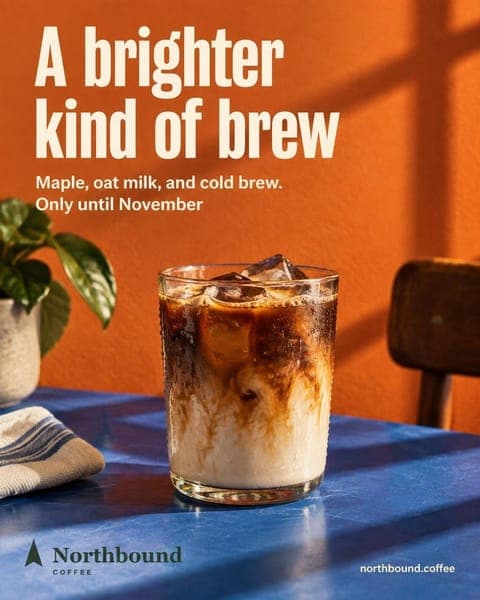
What Feedmakers madeNorthbound Coffee · @northbound.coffee
Which one to choose
Choose Canva if
- you like designing and want to decide every detail
- you also need flyers, presentations, print or video
- you need a free plan without credits
- a team edits the same designs
Choose Feedmakers if
- you run a business and don't have time to design
- you want posts that look like the ones you already published
- you want the caption written and the publishing scheduled
- you manage the Instagram of several businesses
Frequently asked questions
Is Feedmakers free?
It has a free plan: 10 welcome credits and 10 more every month, and up to 20 publications a month. An image costs between 1 and 6 credits depending on the quality you pick. Paid plans start at US$30 a month.
Can I use Canva and Feedmakers together?
Yes. Many businesses design flyers and menus in Canva and use Feedmakers for the feed. You can also upload a piece you made in Canva to Feedmakers: it writes the caption and schedules it.
Does Feedmakers use templates?
No. Each piece is made from your brand's style, read from the posts you upload as references. Without references, it follows a direction written for your industry.
Can Canva publish to Instagram?
Yes, with Canva Pro or higher: its pricing page lists social content scheduling on Pro and marks it unavailable on Free.
Which one is cheaper?
Canva. Its Pro plan costs less per month than the paid Feedmakers plans, because every image Feedmakers makes is generated by AI models that charge per image. Both have a free plan.
More comparisons
All comparisons- Feedmakers vs Predis.ai for Instagram postsTwo AI tools for Instagram: one built for ads and video, one for keeping your look.
- Feedmakers vs ChatGPT for Instagram postsA general assistant against a tool built for a business's Instagram.
- Canva alternatives for Instagram posts: 4 options comparedAdobe Express, Predis.ai, ChatGPT and Feedmakers: what each one does and when it fits.
- Free Linktree alternatives for a business InstagramInstagram's own links, Feedmakers, Beacons and Carrd, against Linktree Free.
- See pricingFeedmakers plans and what each one includes.
Sources
Read on October 16, 2026 on each tool's own site. Prices and plans change: check them before you decide.
Try it with your business
- Free, no card and no watermark
- 10 credits to start and 10 every month
- Publish and schedule up to 20 posts a month